
BMS Integration, is this it?
BMS Integration, is this it?
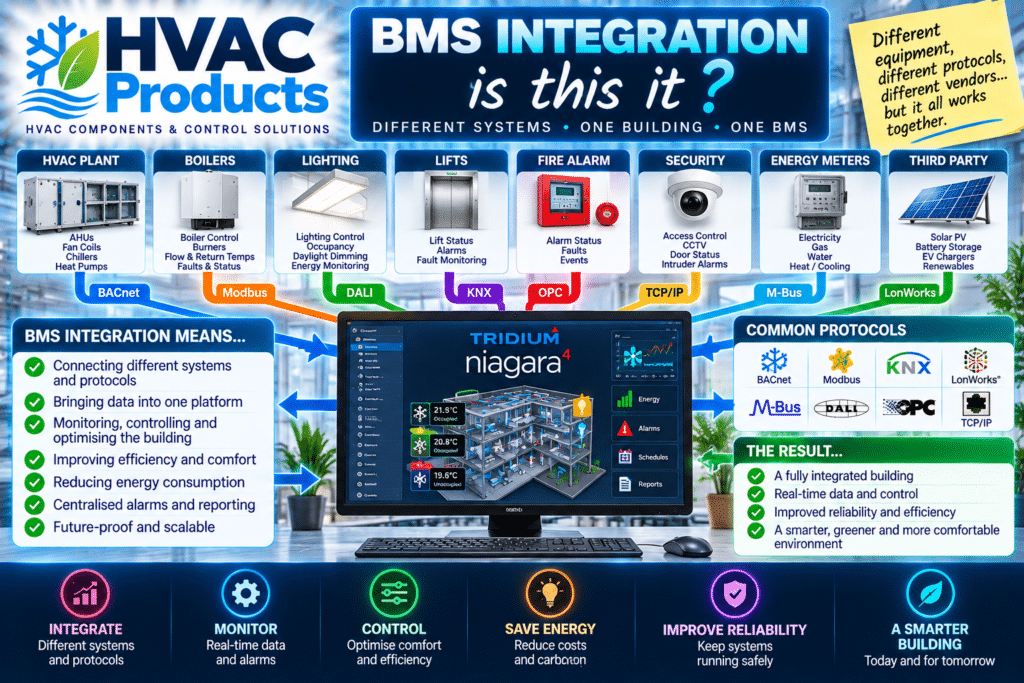
In the Building Management Systems industry, such a big deal is made of this word: integration.
So much so that you see BMS engineers selling themselves as “Integration Engineers” or “Integration Specialists”.
Isn’t this just standard these days? To some degree, everybody is integrating in almost every project. Look at your current input and output points; these are associated with a form of “driver” in one way or another. You configure the driver to look for the IO in the same way you would configure a driver to look for a BACnet link to an AHU or to talk Modbus with electricity meters!
Is this because of salespeople trying to make something more than it is?
Integration is nothing new; BACnet has been around since 1987, and Modbus existed even before then.
I mention these two because, in my experience, they are by far the two most popular network protocols we integrate with. Of course, we can integrate many other networks/drivers in the building environment, and the list keeps growing.
The integration process varies from one control system to another, but the fundamentals are the same.
BACnet is often seen as easier because of its discovery aspect. Once you set it up and enable the driver, you can simply discover any BACnet devices on the network. Once the device is discovered, you then discover the points, alarms, histories, plus more; it really is that simple.
Modbus does not have a discovery option, but if you have the correct information, it should be a breeze, and yes, I do say correct information with a bit of hesitation. You don’t have to work with Modbus for long to know that getting the right information can be a huge pain.
How hard is it?
We will use BACnet IP for the purpose of this demonstration; we will also assume that:
- The site installation is complete and done correctly.
- All devices have been addressed and configured correctly.
- All devices are commissioned and awaiting connection to the BMS.
- We have all the necessary information to integrate the systems.
Of course, as a Building Management Systems Engineer, this is how you should approach every job, right?
The Steps to BACnet IP integration
Add the BACnet driver and set it up.
This sounds more complicated than it is. I’m not going into the process in this post, but there really isn’t much detail. Once you’ve added the driver, you can search for BACnet devices in 10 clicks.
Discover the BACnet devices
Once the driver is configured, you can then select the driver and discover the available devices on the network. Once the discovery is complete, all available devices will appear in the “discovered” panel. These can then be added to your database by simply dragging down.
Discover the information within the BACnet devices
Now that the device is stored in your database, select which objects you want to read/write; these can be physical points, alarm points, schedules, histories, and more. Discover the required points and drag them into your database.
Once the objects are in your database, you can use them like any other object, with the same properties throughout the software. You can add your own extensions, rename, add facets, provide limits, link, the list goes on.
And that is it! You have now integrated a BACnet device using Tridium Niagara 4 software.
Of course, the above example is a little bit crude and oversimplified, but essentially everything is done, and the network between the two devices is communicating. If you simply wanted to read a temperature value in real time, then you would need to do nothing more; it would work!
This would take less than ten minutes from start to finish. Anything further is just working within the Niagara environment anyway; you start adding tags, creating history extensions, creating alarm points…. All this is standard Niagara software engineering that people are doing every day; the integration side of it is purely a means of bringing the information in and, in some cases, it is as simple as drag-and-drop.
1 thought on “BMS Integration, is this it?”
The building management system (BMS) is an overarching control system that is responsible for the automatic regulation and control of non-GMP facility subsystems, maintaining predefined parameters (or set points) and the control of their functionality. The major aim of the BMS is to guarantee the safety of facility operation, while also monitoring and optimizing the use and efficiency of its supervised subsystems to allow more efficient operation. Examples of the major subsystems controlled by the BMS are:
1.
HVAC System. The duct temperature, pressure, and humidity, as well as exhaust temperature, are connected to the BMS, and if their value exceeds defined limits, an alarm is generated.
2.
Central Fume Collection, Laminar Flow Units, Dust Collection System, Central Vacuum System, Heat blowers. The BMS monitors the performance of these systems, allowing for early identification of units requiring maintenance. Sudden breakdown would signal via alarms and then appropriate action can be taken to protect the product.
3.
Technical Steam System. Should, for instance, the pressure or temperature in the piping system fall below the defined regulatory values for clean steam, the BMS shall trigger an alarm, indicating a threat to product quality.
4.
Hot Water System and Central Heating. Temperature and pump control monitoring via the BMS allows for a proper functioning of hot water distribution through the facility.
5.
Chilled Water System. Control of the facility chillers could be supervised by BMS to monitor proper behavior of the system in terms of water/coolant temperature control or pump control to assure proper distribution within the distribution loop.
6.
Sprinkler System (for fire safety).
7.
Electrical Monitoring System. The BMS may monitor the consumed electrical power and the state of main electrical switches.
The number of subsystems connected to the BMS and the level of control is related to the investment decision. However, the two main subsystems, which are usually accounted for in a BMS are HVAC control and electrical systems monitoring.